Cyberpunk Tunnel Visuals for Producers
You are trying to capture that perfect retro-futuristic music video vibe, but spending half your night rendering wireframe tunnels is killing your creative flow. Stop fighting complex 3D plugins and speed up your pipeline. These high-resolution vector motion backdrops deliver instant retro-tech energy to your timeline. If you have ever felt stuck staring at a blank canvas or struggling with slow software, Cyberpunk Tunnel Visuals for Producers offers the solution you need to keep your momentum going.
This collection is designed specifically for creators who want professional-grade aesthetics without the steep learning curve of advanced 3D modeling. Instead of building geometry from scratch, you get a library of pre-rendered assets that bring depth, movement, and style directly into your project. Whether you are editing a short film, creating a lyric video, or producing content for social media, these visuals act as a powerful foundation for your storytelling.
What You Get Inside the Package
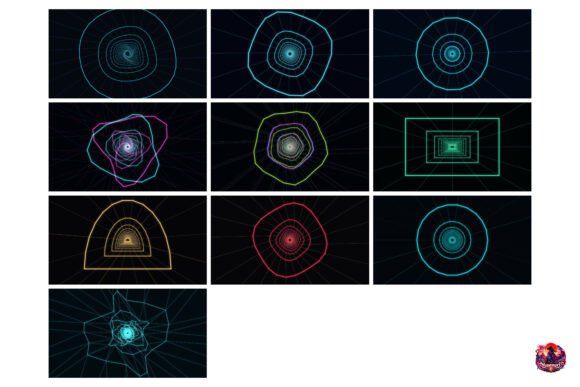
When you acquire this set, you are not just getting a single image; you are receiving a comprehensive toolkit for motion graphics. The package contains 10 distinct video clips in MP4 format, each featuring unique geometric wireframe tunnels. These are not static loops; they are dynamic sequences that draw the viewer's eye forward, mimicking the sensation of traveling through a digital void.
The resolution is a critical factor for modern production standards. Every clip is rendered in ultra-high definition at 3840 x 2160 pixels (4K). This ensures that whether you are displaying your work on a massive cinema screen or a smartphone, the lines remain crisp and the details stay sharp. There is no pixelation or blurring, which is essential when layering text or other effects over the background.
To make the process as seamless as possible, the files are delivered as an instant-download ZIP archive. Once you complete your purchase, you can unzip the folder and immediately start dragging and dropping the clips into your editing software. No waiting for server processing or complicated installation procedures.
How to Integrate These Visuals Into Your Workflow
The versatility of Cyberpunk Tunnel Visuals for Producers makes it suitable for a wide range of applications. The primary goal is to save you time while elevating the visual quality of your output. Here are three practical ways to use these assets effectively:
- Green Screen Compositing: Drop the tunnel footage behind green-screen artist footage. This creates an immersive environment where the performer appears to be floating inside a futuristic data stream. It instantly transforms a simple studio recording into a sci-fi masterpiece.
- Kinetic Typography Backdrops: Use the tunnels as dynamic backgrounds for titles and lyric animations. The moving lines provide a sense of rhythm that matches the beat of your music, making the text feel more integrated and energetic.
- Intro and Outro Segments: Layer these visuals beneath logo overlays to create high-energy brand intros. A fast-moving tunnel draws immediate attention, setting the tone for the rest of your video before the main content even begins.
These use cases apply equally to beginners looking to improve their first video project and professionals refining their final cut. The key is that the heavy lifting of lighting and geometry has already been done for you.
Seamless Compatibility Across All Major Platforms
One of the biggest hurdles in video production is file compatibility. You do not want to spend hours converting formats just to see your asset play. That is why this collection is built to work flawlessly with the industry's most popular tools. You can import these files directly into Adobe Premiere, After Effects, DaVinci Resolve, Final Cut Pro, and CapCut.
If you are a freelancer working on tight deadlines, this cross-platform support means you can switch between devices or collaborate with teams using different software without worrying about technical glitches. The standard MP4 format ensures broad accessibility, allowing you to share your work easily online or upload it to streaming platforms without additional encoding steps.
Why Speed Matters for Creative Flow
In the world of digital creation, time is often the most valuable resource. When you are trying to capture a specific mood, like the neon-soaked aesthetic of cyberpunk, every minute spent troubleshooting a 3D render engine is a minute taken away from your actual creativity. Cyberpunk Tunnel Visuals for Producers eliminates this friction.
By removing the need to manually construct tunnels, adjust camera paths, or wait for renders to finish, you reclaim hours of your schedule. This allows you to focus on what truly matters: the story, the music, and the emotional impact of your piece. It shifts your role from a technical operator to a true director, giving you the freedom to experiment with different compositions and pacing without fear of technical failure.
Considerations Before You Start Editing
While these assets are designed to be user-friendly, there are a few things to keep in mind to get the best results. First, consider the color grading of your foreground elements. Since the tunnels feature high-contrast wireframes, ensure your text or subjects have enough contrast to stand out against the busy background. Using drop shadows or adjusting the brightness of the tunnel track can help separate your subject from the backdrop.
Second, think about the pacing of your edit. The tunnels have a natural forward momentum. Try to match the speed of your cuts or transitions to the velocity of the tunnel movement. If the tunnel feels too fast, you might want to slow down the playback speed slightly in your editor to create a more dramatic effect. Conversely, speeding it up can add a sense of urgency and chaos.
Finally, remember that these are vector-based motion graphics. While they look great at full resolution, scaling them down too much on very small screens might make the fine details harder to distinguish. Always preview your project at the intended display size to ensure the visual hierarchy remains clear.
Ready to Elevate Your Projects?
If you are tired of generic stock footage or the frustration of broken 3D plugins, it is time to upgrade your toolkit. Cyberpunk Tunnel Visuals for Producers provides the perfect blend of aesthetic appeal and practical utility. With 10 distinct 4K clips ready to go, you have everything you need to craft stunning retro-tech experiences.
Whether you are a marketer creating a high-energy commercial, an educator designing engaging educational videos, or a hobbyist making music videos for fun, these backdrops offer a professional touch that is easy to achieve. Get instant access to your digital files now and keep your focus on the edit. Let the visuals speak for themselves while you handle the creativity.