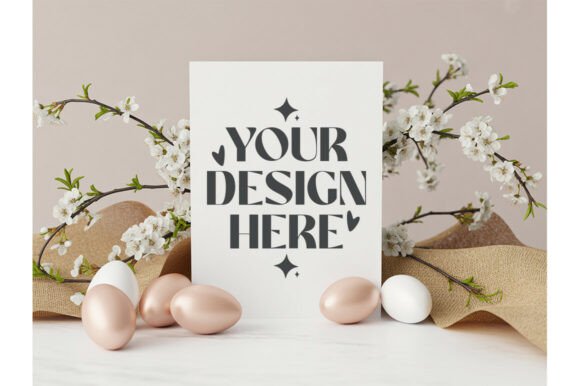
Easter Invitation Mockup, 5x7 Card PSD: A Practical Guide to Elevating Your Designs
When you are designing an invitation for a special occasion, the difference between a good design and a great one often lies in presentation. This is where the Easter Invitation Mockup, 5x7 Card PSD becomes an essential tool for creators and small business owners alike. It is not merely a digital image; it is a professional bridge that connects your flat illustration to the client's imagination. Whether you are showcasing watercolor florals, SVG cut files, or hand-drawn details, this specific mockup format allows you to display your work in a realistic setting without needing a photographer or a studio.
Many designers, particularly those just starting out on platforms like Etsy or selling services on Fiverr, make the mistake of uploading only the raw digital file. While the file itself might be perfect, the lack of context can leave potential buyers guessing about the final product's scale and texture. By utilizing a high-quality 5×7 invitation mockup, you provide immediate visual clarity. You transform a two-dimensional graphic into a tangible object that feels real, textured, and ready for print.
The Hidden Pitfalls of Choosing the Wrong Mockup
Not all mockups are created equal, and selecting the wrong template can inadvertently hurt your sales or confuse your clients. One of the most common errors is ignoring the aspect ratio. The standard size for many greeting cards and invitations is 5×7 inches. If you use a generic card mockup that does not match these dimensions, your design will appear stretched or squashed when placed on the card. This distortion looks unprofessional and suggests a lack of attention to detail.
Another frequent misunderstanding involves the file type. You may find free "mockup for Canva" options that look appealing at first glance but lack the necessary layers. A true PSD smart object mockup allows you to double-click a layer to insert your own artwork, which then automatically conforms to the folds, shadows, and lighting of the card. If you download a simple PNG image and try to Photoshop your design over it manually, you risk misalignment and unrealistic shadows that break the illusion of reality.
Furthermore, consider the style of the mockup against your design aesthetic. Using a rustic wedding suite mockup with a sleek, modern minimalist design creates a jarring contrast that distracts from your art. Similarly, placing a delicate floral Easter design on a rough, dark wood background might obscure the soft colors you worked so hard to create. The goal is to enhance the product, not compete with it.
Why Resolution and Lighting Matter
Low-resolution mockups are a silent killer of credibility. If your invitation design is crisp and high-definition, but the mockup background is pixelated or grainy, the entire presentation suffers. Clients often assume that if the presentation is low quality, the product inside must be too. Always ensure that the cardstock mockup photoshop file is high resolution (at least 300 DPI) so that it looks sharp on both desktop screens and mobile devices.
Lighting is equally critical. Some older or poorly made templates have harsh, artificial shadows that do not mimic natural light. A stylized photography mockup should feature soft, diffused lighting that highlights the texture of the paper. If the shadows are too dark, they hide the details of your typography or illustrations. Conversely, if the lighting is too flat, the card looks like it is floating rather than resting on a surface. Look for mockups that offer adjustable shadow controls or multiple lighting presets to find the perfect balance.
Maximizing Efficiency with Smart Object Technology
Once you have selected the right card mockup bundle, understanding how to use it efficiently is key. The beauty of a smart object mockup lies in its non-destructive editing capabilities. Instead of erasing parts of the card to fit your design, you simply open the linked smart object layer in your software, paste your artwork, save, and close. The main file updates instantly, preserving the perspective and effects of the original scene.
This workflow saves hours of manual retouching. For example, if you are creating a boho wedding invitation mockup series, you can apply the same mockup structure to different color palettes quickly. However, beginners often overlook the importance of scaling their artwork correctly before pasting it into the smart object. Always check the dimensions of your source file against the intended print size. If your design is too small, it will look blurry; if it is too large, it will get cropped awkwardly by the mockup's boundaries.
Additionally, pay attention to the card suite mockup features. Many bundles include matching RSVP cards, envelopes, and detail cards. These elements help tell a complete story. A standalone card might look nice, but showing a full wedding stationery mockup set demonstrates the cohesion of your design system. This approach is particularly effective for modern wedding invite mockup projects where consistency across all pieces is paramount.
Choosing the Right Context for Your Niche
Different occasions call for different visual contexts. A baby shower invitation mockup benefits from soft, pastel backgrounds and gentle textures, whereas a birthday card mockup might allow for bolder, more vibrant settings. When evaluating a greeting card mockup png or a PSD file, ask yourself: Does this background support the emotion of the event? A spring card mockup with fresh greens and blooming flowers is ideal for Easter, while a minimalist boho invite mockup works best for understated elegance.
For entrepreneurs selling digital downloads, the choice of mockup also impacts SEO and click-through rates. Listings that feature realistic, high-quality images tend to perform better because they build trust. A printable invite mockup that clearly shows the final result reduces buyer hesitation. Customers want to know exactly what they are getting, especially when purchasing digital files that require them to print at home or use a professional service.
Final Checklist Before You Design
Before you dive into creating your next project, take a moment to verify your resources. Ensure your chosen Easter Invitation Mockup, 5x7 Card PSD includes editable layers for text, shadows, and background changes. Check if it supports double card mockup 5×7 formats if you plan to show front-and-back designs. Verify that the file is compatible with your version of Photoshop or Canva to avoid technical frustrations later.
Ultimately, the goal is to present your work with integrity and professionalism. By avoiding common mistakes related to sizing, resolution, and stylistic mismatch, you ensure that your invitation mockup bundle serves as a powerful marketing asset. Whether you are showcasing elegant 5×7 card mockup designs for weddings or delicate florals card mockup ideas for spring events, the right presentation elevates your brand and helps your clients visualize the magic of their upcoming celebration.
Remember, a well-chosen mockup does more than just display an image; it communicates quality, care, and attention to detail. It turns a simple digital file into a cherished keepsake in the mind of the viewer. Take the time to select the right tools, master the smart object workflow, and let your creativity shine through a frame that does justice to your hard work.